Updates
Latest changes, new features and bug fixes
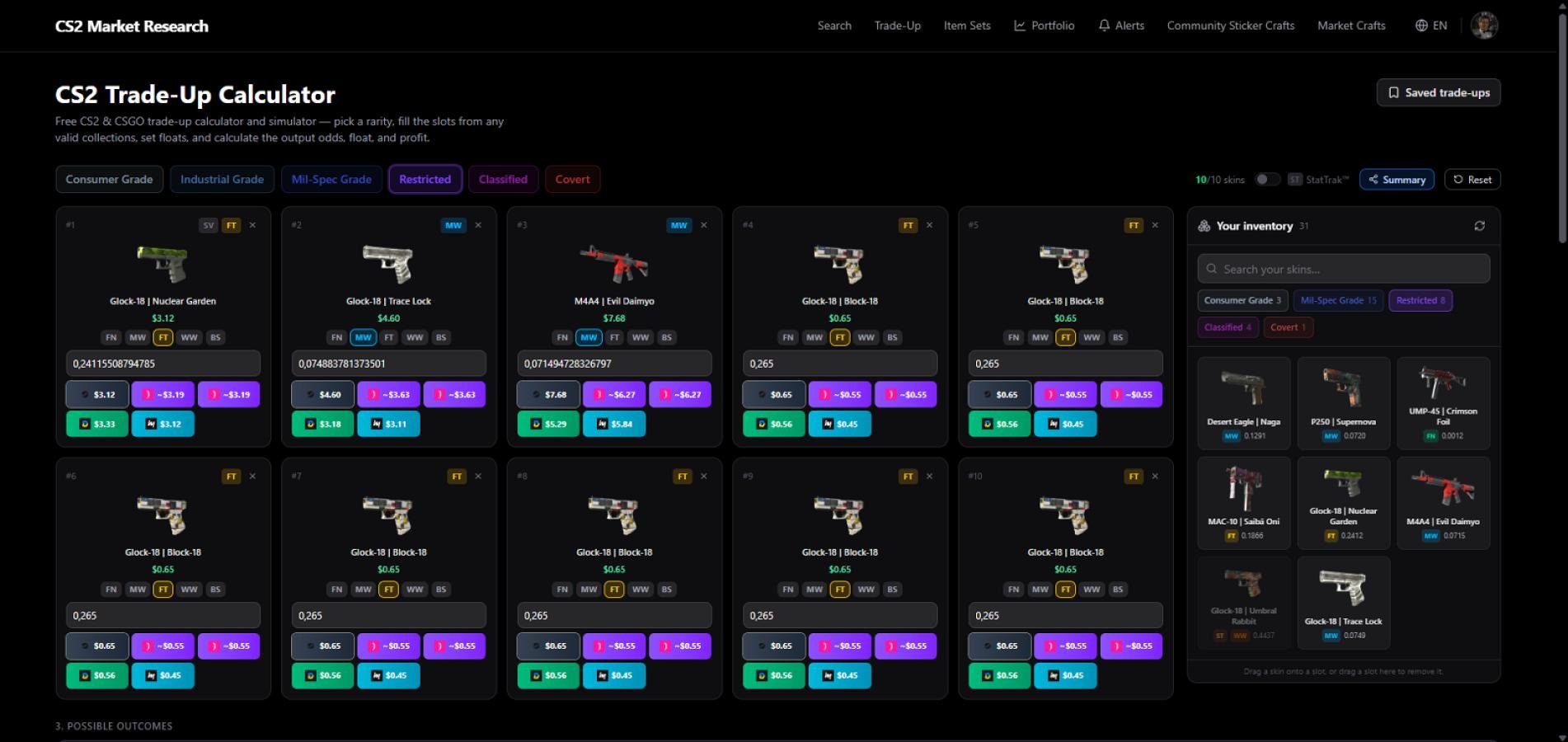
Importing Skins from Steam Inventory — Now Available in Crafts
We've added a long-awaited feature: import skins directly from your Steam inventory. Now all the items you own in Steam can be used instantly for crafting right here on our site.
What this gives you
Real float values from Steam. Every item is pulled in along with its exact float value, so you no longer need to manually look up or guess the wear — it's all there automatically.
Faster trade-up workflow. Items for crafting are now taken directly from your inventory, making it much faster to assemble a contract and calculate the outcome.
More accurate calculations. Since the floats are real, the trade-up result calculation is as close to reality as possible — no guesswork, no margin of error.
How it works
Connect your Steam inventory.
Your skins appear in the list of items available for crafting — along with their floats.
Add them to a trade-up and instantly see the calculated outcome.
No more manual data entry needed — the site automatically pulls everything from your inventory. Just log in, pick your items, and craft faster and more accurately. 🚀
🔗 https://cs2marketresearch.com/trade-up
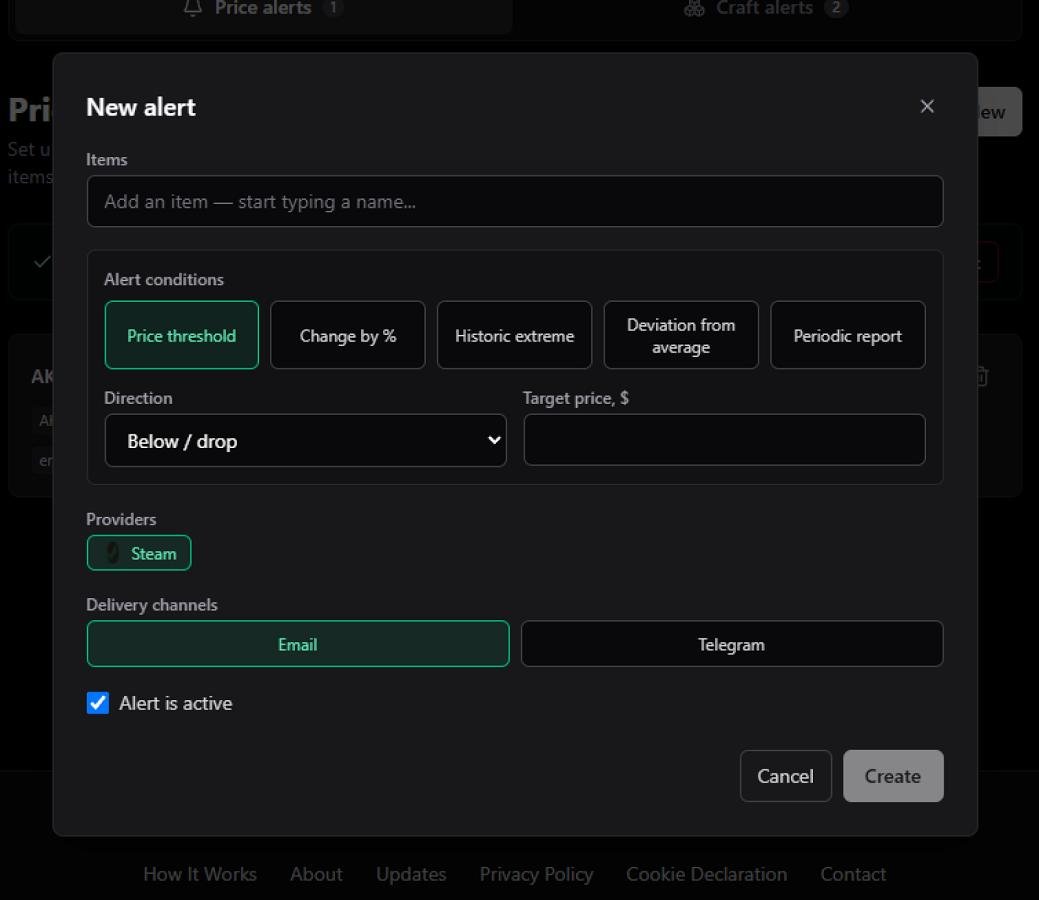
CS2 Price Alerts — Track Skin Baskets, Drops & Craft Appearances | CS2 Market Research
Basket Alerts
Stop setting up separate alerts for every item. One alert tracks a whole collection of skins simultaneously — perfect for monitoring a craft kit, a set you're building, or a wishlist.
Flexible Per-Item Triggers
Each skin in your basket can have its own rule: target price range, price movement direction, % change over a time window, or a periodic reminder. Or flip the checkbox to apply identical conditions to every item at once.
Variant & Wear Selection
Choose StatTrak™, Souvenir, or Normal — and pick a specific wear float or leave it as Any to always track the cheapest available option.
Live Prices in the Form
No need to switch tabs. A popover shows real-time Steam prices for all wear variants directly as you build your alert.
Item Set Appearance Alerts
Saved a craft? Get notified when that exact appearance — or a close match — goes live on DMarket or White Market. The moment your dream craft surfaces, you'll know.
Email + Telegram Delivery
Alerts land in your inbox and/or Telegram bot. No paid subscription, no premium tier — just free notifications when the market moves your way.
→ Set up your first alert — it's free
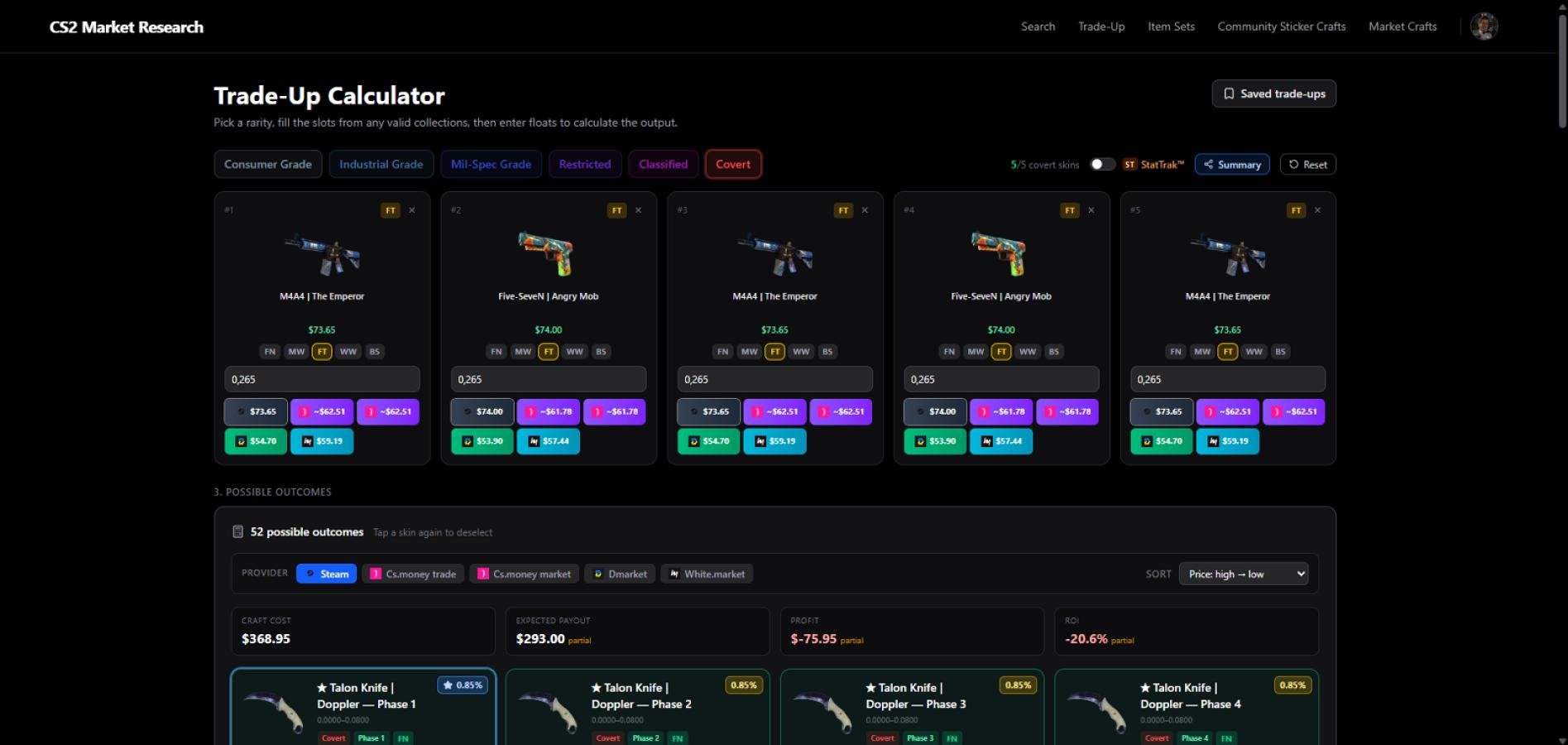
Trade-up contracts are now live on cs2marketresearch.com.
Explore contracts here:
Trade-Up Contracts — https://cs2marketresearch.com/trade-up
💰 Profit & ROI calculator
Every contract shows a full breakdown — input costs, expected output value, and calculated ROI. Prices are pulled from live marketplaces and updated daily, so your numbers always reflect what's actually on the market right now.
🎯 Fast Pick — fill all slots instantly
Know which skin you want to craft? Use Fast Pick to select the target outcome first — all 10 input slots are filled automatically with matching items. From there you decide what to swap: adjust floats, replace items, or tweak the lineup to improve your odds or cut costs.
🎚️ Float targeting for outcomes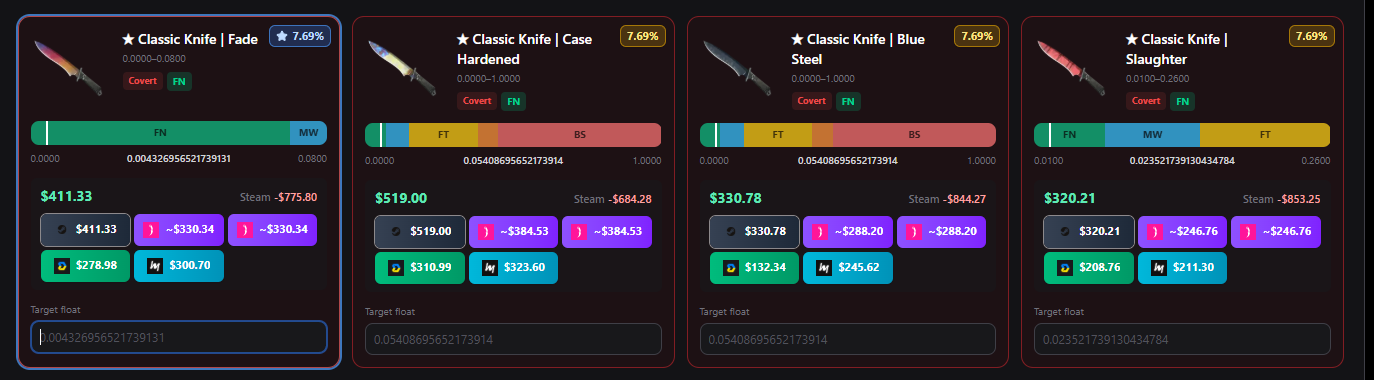
Set a target float on any outcome skin and the calculator will immediately show which input items are suitable to hit that float range. No manual math — just set the target and see what fits.
🔍 Fast Search — buy the cheapest inputs
Once your contract is built, Fast Search finds the cheapest available listings for every input item across all connected marketplaces. Buy the most profitable combination in the fewest clicks.
⚙️ Custom float ranges
You can fine-tune the float of each input item manually. Narrow the range to chase a specific outcome float, or widen it to find cheaper inputs — full control over every slot.
📅 Daily price updates
Input and output prices are refreshed every day from Steam Community Market, White Market, DMarket, and CS.MONEY. Your ROI calculation is always based on today's real prices, not stale data.
🔗 Save, share, and reuse trade-ups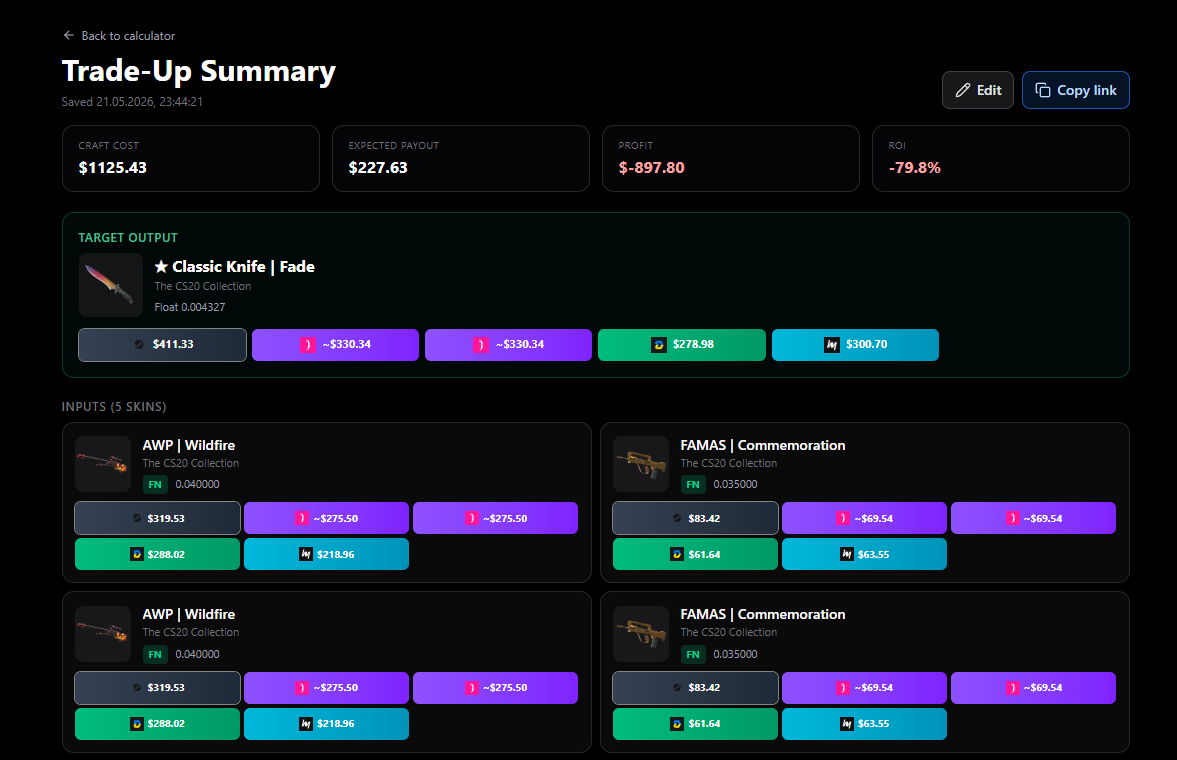
You can save any trade-up as a set and share it with other people. If someone opens your link, they can load the same contract and freely change everything for themselves — swap items, adjust floats, change the target outcome, and rebuild the trade-up to fit their own budget or goals. It’s an easy way to share ideas, compare setups, and iterate together without starting from scratch.
Give it a try and let us know what to improve. 👍
Knives & Gloves search — by float, wear & paint seed
You can now hunt down the exact knife or glove you want — not just the skin, but the specific float, wear and paint seed combination. One click sends you straight to live listings on connected marketplaces so you can compare prices instantly. 🔪🧤
Start here:
Knives search — https://cs2marketresearch.com/items/knives/all
Gloves search — https://cs2marketresearch.com/items/gloves/all
🎯 What you can filter by
Float range — set min/max to target Factory New low-floats, clean FT specimens, or anything in between.
Wear / exterior — FN, MW, FT, WW, BS.
Paint seed (pattern) — pin specific patterns (e.g. Case Hardened blue gems, Doppler phases, Fade percentages).
Knife / glove type — pick the model you actually want (Karambit, Butterfly, Sport Gloves, etc.).
🛒 Compare prices across marketplaces
Once your filters are set, jump straight to matching listings on:
Steam Community Market
White Market
DMarket
No copy-pasting floats, no re-typing pattern IDs — the query is built and applied for you.
💾 Save and repeat searches
You can save any search as a set and come back to it later. If you do not find the exact item right away, just repeat the same search again — your float and pattern filters stay saved, so you can quickly check new listings without setting everything up from scratch.
💡 Why it matters
Knives and gloves trade on float and pattern as much as on skin name. The same Karambit Fade can swing hundreds of dollars depending on fade percentage; a Case Hardened can go from a few bucks to a small fortune on the right seed. Now you can scan all the major platforms with the same filter set and find the best price for the exact item you want.
Feedback welcome — try it out and let us know what to add next. 👍
Update on CS2 Market Research
Update on CS2 Market Research
You can now search skins with specific sticker crafts and instantly open matching listings on Steam Market or White.market.
Build your sticker combo, apply filters, and jump straight to real listings.
🔎 Sticker craft builder
🎯 Skin + sticker search
🛒 Direct search on Steam & White.market
🚀 Site Update
New features just dropped on cs2marketresearch.com:
• Patches added — you can now search items with specific patches.
• Charms added — charms are now supported in the search as well.
• Improved sorting for player stickers — player autograph stickers are now grouped by team by default, making it much easier to browse tournament capsules.
Try it here:
https://cs2marketresearch.com/
Feedback is always welcome 👍